






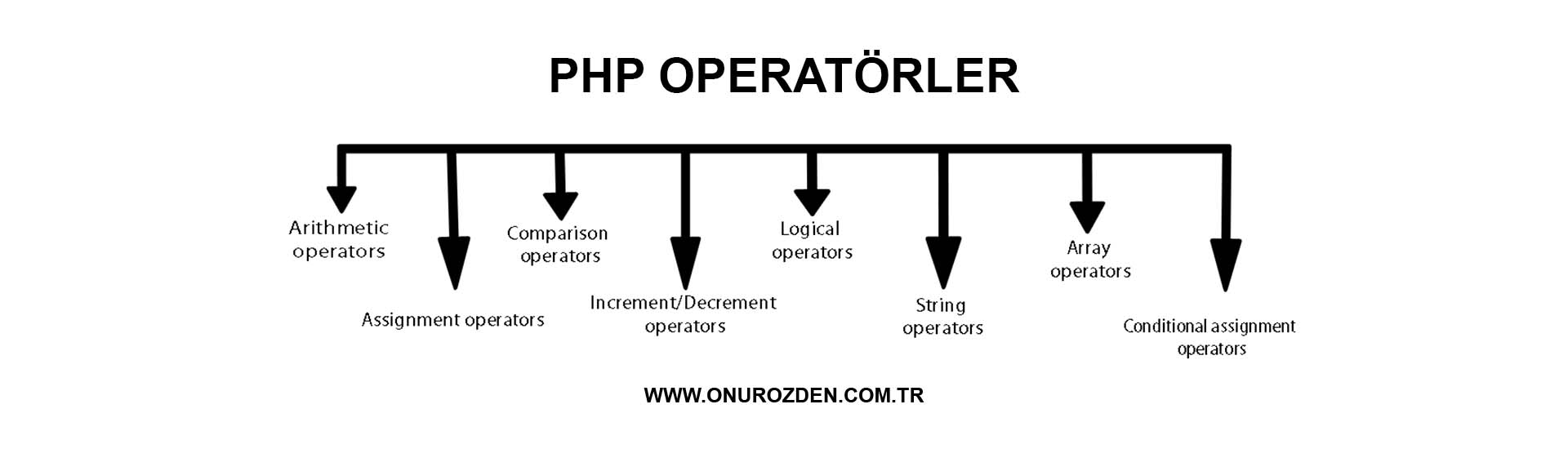
In this lesson, we will learn about PHP operators. We explained all the operators and their usage areas in PHP completely and in detail, with examples.
Characters or words that perform operations between one or more values are called operators or operators. The English word for operator is operator and it is known as operator in Turkish. However, some sources mention it as an operator. Both carry the same meaning.
PHP Operators
PHP Arithmetic Operators
PHP arithmetic operators are used with numerical values to perform common arithmetic operations such as addition, subtraction, multiplication.
| operator | name | example |
| + | Addition | $a + $b |
| - | Subtraction | $a - $b |
| * | Multiplication | $a * $b |
| / | division | $a / $b |
| % | Modulus (modulus) | $a % $b |
PHP Arithmetic Operator Examples
We add 2 values with the addition operator. In this example we used the php addition operator:
echo 2+4; // Çıktı: 6We subtract one value from another with the subtraction operator. In this example we used the php subtraction operator:
echo 5-2; // Çıktı: 3We divide one value by another value with the division operator. In this example we used the php split operator:
echo 6/2; // Çıktı: 3We multiply one value by another value with the multiplication operator. In this example we used the php multiplication operator:
echo 5*2; // Çıktı: 10With the modulus operator, we find the remainder when one value is divided by another value. In this example we used the php module operator:
echo 7%2; // Çıktı: 1PHP Assignment Operators
PHP assignment operators are used to assign values.
| operator | name | example |
| = | Assignment | $a = $b |
| += | Collect and Discard | $a +=4 |
| -= | Subtract and Assign | $a -=4 |
| *= | Divide and Assign | $a /=4 |
| *= | Multiply and Assign | $a *=4 |
| %= | Module and Assign | $a%=4 |
PHP Assignment Operator Examples
We assigned the value on the right to the left operand with the equal operator.
$a = 20;We assigned the sum of the left and right variables to the variable with the add and assign operator.
$a = 10;
$b = 15;
$a += $b; // $a değişkeninin değeri 25
// Üst satırdaki ifade ile $a = $a + $b ifadesi aynı.
With the subtract and assign operator, we assigned the result of subtracting the value of the variable on the right from the value of the variable on the left to the variable.
$a = 20;
$b = 10;
$a -= $b; // $a değişkeninin değeri 10
// Üst satırdaki ifade ile $a = $a - $b ifadesi aynı.
With the divide and assign operator, we assigned to the variable the result of how many times the value of the variable on the left can be divided by the value of the variable on the right.
$a = 12;
$b = 4;
$a /= $b; // $a değişkeninin değeri 3
// Üst satırdaki ifade ile $a = $a / $b ifadesi aynı.
With the multiply and assign operator, we assigned the result of multiplying two variable values to the variable.
$a = 2;
$b = 2;
$a *= $b; // $a değişkeninin değeri 4
// Üst satırdaki ifade ile $a = $a * $b ifadesi aynı.
Using the module and assign operators, we assigned the variable the remainder when the value of the variable on the left was divided by the value of the variable on the right.
$a = 8;
$b = 3;
$a %= $b; // $a değişkeninin değeri 2
// Üst satırdaki ifade ile $a = $a % $b ifadesi aynı.
PHP Comparison Operators
PHP comparison operators are used to compare two values.
| operator | name | example |
| == | Equal | $a == $b |
| === | equivalent | $a === $b |
| != | Not Equal (not equal) | $a != $b |
| !== | Not identical | $a !== $b |
| <> | Not Equal (not equal) | $a <> $b |
| > | Greater than | $a > $b |
| < | Less than | $a < $b |
| >= | Greater than or equal to | $a >= $b |
| <= | Less than or Equal to (less than or equal to) | $a <= $b |
PHP Comparison Operator Examples
We checked the equality of two values with the equal operator.
$a = 4;
$b = 2;
if ($a == $b) {
    echo "A, B'ye eşittir";
} else {
    echo "A, B'ye eşit değildir";
}
// Çıktı: A, B'ye eşit değildir
We checked the equivalence of two values with the identical operator.
$a = 4;
$b = '4';
if ($a === $b) {
    echo "A, B'ye denktir";
} else {
    echo "A, B'ye denk değildir";
}
// Çıktı: A, B'ye denk değildir
We checked the inequality of two values with the not equal operator.
$a = 4;
$b = 3;
if ($a != $b) {
    echo "A, B'ye eşit değildir";
} else {
    echo "A, B'ye eşittir";
}
// Çıktı: A, B'ye eşit değildir
We checked the inequality of two values with the not identical operator.
$a = 4;
$b = '4';
if ($a !== $b) {
    echo "A, B'ye denk değildir";
} else {
    echo "A, B'ye denktir";
}
// Çıktı: A, B'ye denk değildir
We checked the inequality of two values with the not equal operator.
$a = 4;
$b = 2;
if ($a <> $b) {
    echo "A, B'ye eşit değildir";
} else {
    echo "A, B'ye eşittir";
}
// Çıktı: A, B'ye eşit değildir
We checked whether the value on the left was greater than the value on the right with the greater than operator.
$a = 4;
$b = 2;
if ($a > $b) {
    echo "A, B'den daha büyüktür";
} else {
        echo "A, B'den daha büyük değildir";
}
// Çıktı: A, B'den daha büyüktür
We checked whether the value on the left was smaller than the value on the right with the less than operator.
$a = 2;
$b = 4;
if ($a < $b) {
echo "A, B'den daha küçüktür";
} else {
echo "A, B'den daha küçük değildir";
}
// Çıktı: A, B'den daha küçüktürWe checked whether the value on the left is greater than or equal to the value on the right with the greater than or equal to operator.
$a = 4;
$b = 2;
if ($a >= $b) {
    echo "A, B'den daha büyüktür veya eşittir";
} else {
        echo "A, B'den daha büyük veya eşit değildir";
}
// Çıktı: A, B'den daha büyüktür veya eşittir
We checked whether the value on the left is less than or equal to the value on the right with the less than or equal to operator.
$a = 2;
$b = 4;
if ($a <= $b) {
    echo "A, B'den daha küçüktür veya eşittir";
} else {
        echo "A, B'den daha küçük veya eşit değildir";
}
// Çıktı: A, B'den daha küçüktür veya eşittir
PHP Increment/Decrement Operators
PHP increment operators are used to increase the value of a variable. PHP decrement operators are used to decrease the value of a variable.
| operator | name |
| ++$i | Increment Before (pre-increment) |
| $i++ | After Increment (post-increment) |
| --$i | Decrease Before (pre-decrement) |
| $i-- | After Decrement (post-decrement) |
PHP Increment Decrement Operator Examples
The pre-increment operator first increases the value of variable $i and then returns the variable $i.
$i = 10;
echo ++$i; // Çıktı: 11
Then the post-increment operator returns variable $i, then increments the value of variable $i.
$i = 10;
echo $i++; // Çıktı: 10
The pre-decrement operator first decreases the value of variable $i and then returns the variable $i.
$i = 10;
echo --$i; // Çıktı: 9
Then the post-decrement operator returns the variable $i, then decrements the value of the variable $i.
$i = 10;
echo ++$i; // Çıktı: 10
PHP Logical Operators
PHP logical operators are used to combine conditional expressions.
| operator | name | example |
| oath | and (and) | $a and $b |
| or | or (or) | $a or $b |
| xor | xor | $a xor $b |
| && | and (and) | $a && $b |
| || | or (or) | $a || $b |
| ! | not (note) | $a! $b |
PHP Logical Operator Examples
And the (and) operator returns true if the condition in $a and $b is met.
$a = 100;
$b = 50;
if ($a === 100 and $b === 50) {
    echo "A, 100'e denktir ve B, 50'e denktir";
}
// Çıktı: A, 100'e denktir ve B, 50'e denktir
The or (or) operator returns true if the condition in $a or $b is met.
$a = 100;
$b = 50;
if ($a === 100 or $b === 75) {
    echo "A, 100'e denktir veya B, 75'e denktir";
}
// Çıktı: A, 100'e denktir veya B, 75'e denktir
And the (and) operator returns true if the condition in $a and $b is met.
$a = 100;
$b = 50;
if ($a === 100 && $b === 50) {
    echo "A, 100'e denktir ve B, 50'e denktir";
}
// Çıktı: A, 100'e denktir ve B, 50'e denktir
The or (or) operator returns true if the condition in $a or $b is met.
$a = 100;
$b = 50;
if ($a === 100 || $b === 75) {
    echo "A, 100'e denktir veya B, 75'e denktir";
}
// Çıktı: A, 100'e denktir veya B, 75'e denktir
The xor operator returns true only if the condition in $a or $b is met.
$a = 100;
$b = 50;
if ($a === 100 xor $b === 75) {
    echo "A, 100'e denktir veya B, 75'e denktir";
}
// Çıktı: A, 100'e denktir veya B, 75'e denktir
The not operator returns true if the condition in $a is not met.
$x = 50;
if ($x !== 75) {
    echo "X, 75'e denk değildir";
}
// Çıktı: X, 75'e denk değildir
PHP Text Operators (String Operators)
PHP has 2 operators designed for texts:
Concatenation operator and concatenation assignment operator.
| operator | name | example |
| . | Concatenation operator | $a . $b |
| .= | Concatenation assignment operator | $a .= $b |
PHP Text Operator Examples
The concatenation operator combines two data. In the example below, we combined the data of $a and $b variables and printed them.
$a = "Hello ";
$b = " World!";
echo $a . $b;
// Çıktı: Hello World!
The concatenation assignment operator adds the second data next to the first data. In the example below, we added the data of variable $b next to the data of variable $a and printed the variable $a.
$a = "Hello ";
$b = " World!";
$a .= $b;
echo $a;
// Çıktı: Hello World!
PHP Array Operators
Array operators in PHP are used to compare arrays.
| operator | name | example |
| + | Union Operator (union) | $a + $b |
| == | Equality Operator (equality) | $a == $b |
| === | Equivalence Operator (identity) | $a === $b |
| != | Inequality Operator (inequality) | $a != $b |
| <> | Inequality Operator (inequality) | $a <> $b |
| !== | Imbalance Operator (non-identity) | $a !== $b |
PHP Array Operator Examples
The union operator combines arrays.
$a = array('a' => 'kırmızı', 'b' => 'mavi');
$b = array('c' => 'yeşil', 'd' => 'sarı');
print_r($a + $b);
// Çıktı: Array ( [a] => kırmızı [b] => mavi [c] => yeşil [d] => sarı )
The equality operator (equality) provides equality control in arrays. We can find out whether the data of two arrays are equal or not with the equality operator.
$a = array('a' => 'kırmızı', 'b' => 'mavi');
$b = array('c' => 'yeşil', 'd' => 'sarı');
if ($a == $b) {
	echo "A, B'ye eşittir";
} else {
	echo "A, B'ye eşit değildir";
}
// Çıktı: A, B'ye eşit değildir
The identity operator provides equality control in arrays. We can find out whether the data of two arrays are equivalent with the equivalence operator.
$a = array('a' => 'kırmızı', 'b' => 'mavi');
$b = array('c' => 'yeşil', 'd' => 'sarı');
if ($a === $b) {
	echo "A, B'ye denktir";
} else {
	echo "A, B'ye denk değildir";
}
// Çıktı: A, B'ye denk değildir
The inequality operator (inequality) provides inequality control in arrays. We can learn that the data of two arrays are not equal with the inequality operator.
$a = array('a' => 'kırmızı', 'b' => 'mavi');
$b = array('c' => 'yeşil', 'd' => 'sarı');
if ($a != $b) {
	echo "A, B'ye eşit değildir";
} else {
	echo "A, B'ye eşittir";
}
// Çıktı: A, B'ye eşit değildir
The inequality operator (inequality) provides inequality control in arrays. We can learn that the data of two arrays are not equal with the inequality operator.
$a = array('a' => 'kırmızı', 'b' => 'mavi');
$b = array('c' => 'yeşil', 'd' => 'sarı');
if ($a  $b) {
	echo "A, B'ye eşit değildir";
} else {
	echo "A, B'ye eşittir";
}
// Çıktı: A, B'ye eşit değildir
The non-identity operator provides non-identity control in arrays. We can find out that the data of two arrays are not equivalent with the inequality operator.
$a = array('a' => 'kırmızı', 'b' => 'mavi');
$b = array('c' => 'yeşil', 'd' => 'sarı');
if ($a !== $b) {
	echo "A, B'ye denk değildir";
} else {
	echo "A, B'ye denktir";
}
// Çıktı: A, B'ye denk değildir
PHP Conditional Assignment Operators
PHP' conditional assignment operators are used to assign a value based on conditions.
| operator | name | example |
| ?: | Ternary Operator (ternary) | $a = expr1 ? expr2 : expr3 |
| ?? | Null Coalescing Operator (null coalescing) | $a = expr1 ?? expr2 |
PHP Conditional Assignment Operator Examples
The ternary operator assigns conditional data. In the example below, we assigned the data "not logged in" to the $status variable if the empty($user) condition returns true, and "logged in" if it returns false.
// Örnek 1:
$user = "Onur Özden";
echo $status = (empty($user)) ? "giriş yapılmadı" : "giriş yapıldı";
// empty($user) koşulu false ise, $status değişkenine "giriş yapıldı" değerini ata, true ise $status değişkenine "giriş yapılmadı" değerini ata.
// Örnek 2:
$user = "Onur Özden";
echo $status = (empty($user)) ? 0 : 1;
// empty($user) = false ise, $status değişkenine 0 değerini ata, true ise $status değişkenine 1 değerini ata.
The null coalescing operator assigns conditional data. If the first data exists and is not null, the value of $a is the first data. If the first data does not exist or is null, the value of $a is the second data. In the example below, we assigned the data "not logged in" to the $status variable if the empty($user) condition returns true, and "logged in" if it returns false.
// $_GET['user'] varsa ve null değilse $user değişkenine değer olarak atanır, $_GET['user'] yoksa veya null ise $user değişkenine "giriş yapılmadı" metni değer olarak tanır.
echo $user = $_GET['user'] ?? 'giriş yapılmadı';
// Çıktı: giriş yapılmadı
// $car değişkeni varsa ve null değilse $car değişkenine $car değişkeninin değeri atanır, $car değişkeni yoksa veya null ise $car değişkenine 'BMW' değeri atanır.
echo $color = $color ?? 'BMW';
// Çıktı: BMW
PHP Operator Priority
Operator Priority Examples
As in mathematics, operators in PHP have some priority values. Let's understand this with an example.
echo 3 + 5 * 2; // Çıktı: 13In the above process the output will be 13. Because multiplication takes priority over addition. Therefore, multiplication was performed first and then addition. However, it is possible to intervene in the processing priority.
echo (3 + 5) * 2; // Çıktı: 16In the above process the output will be 16. Because we prioritized the addition process by placing it in parentheses. Therefore, first addition was performed, then multiplication was performed. This is how we intervened in transaction priority.
Operators' Priority Table
In the table below, operators are listed in order from highest priority to lowest priority. Operators on the same line have equal priority and the order in which they will be handled is decided during the evaluation. We've included the precedence table of all operators in PHP below.
| attribution | operators | |
|---|---|---|
| (none) | clone new | |
| (none) | ** | |
| from the right | + - ++ -- ~ (int) (float) (string) (array) (object) (bool) @ | |
| from left | instanceof | |
| (none) | ! | |
| from left | * / % | |
| from left | + - . | |
| from left | << >> | |
| from left | . | |
| directionless | < <= > >= | |
| directionless | == != === !== <> <=> | |
| left | & | |
| from left | ^ | |
| from left | | | |
| from left | && | |
| from left | || | |
| right | ?? | |
| directionless | ? : | |
| from the right | = += -= *= **= /= .= %= &= |= ^= <<= >>= ??= | |
| (none) | yield from | |
| (none) | yield | |
| (none) | print | |
| from left | and | |
| from left | xor | |
| from left | or |
This table is taken from php.net. Source: https://www.php.net/manual/tr/language.operators.precedence.php