






https seois a trust factor that directly determines the ranking of your website Google in search engine results and a mandatory technical standard that ensures encryption of data transmission. Nowadays, switching a website to the HTTPS protocol is not just a security choice, but a basic obligation to maintain search engine visibility.
What is HTTPS and Why is it a Must for SEO?
HTTPS is a secure protocol structure that encrypts the data flow between your website and your visitors, preventing third parties from accessing this information. Since search engines always prioritize the security of their users, they push unsafe sites to the lower ranks in the search results. The three main layers underlying this protocol also form the basis of modern SEO strategies. First, the encryption layer ensures the confidentiality of user data. Second, the data integrity layer verifies that data has not been modified during transfer. Finally, the authentication layer ensures that the user is interacting with the correct website. In order for a website to comply with these standards, it must have the following basic elements:
- SSL certificate that is valid and approved by an authoritative institution.
- TLS 1.2 or TLS 1.3 protocols are active on the server side.
- Serving all internal pages and static files over a secure connection.
Google SSL Certificate as a Ranking Factor
Google, with its official announcement in 2014, announced that it accepted the SSL certificate as a ranking signal. Since then, the HTTPS protocol has become an integral part of Page Experience signals. A site with an SSL certificate gains a direct ranking advantage over its competitor without one. This creates a small but decisive difference, especially in sectors where competition is high. Google Commonly used browsers such as Chrome warn users by marking sites broadcasting over HTTP with the "Not Secure" label. While this warning increases the site's bounce rates, it indirectly hits organic rankings. The following table compares the main differences between HTTP and HTTPS according to their ranking and security criteria:
| Feature | HTTP Protocol | HTTPS Protocol |
|---|---|---|
| Data Encryption | There is no encryption, data is plain text. | It has strong TLS encryption. |
| Browser Icon | Red exclamation or warning text. | Gray or green lock icon. |
| Google Sorting Effect | Negative or neutral effect. | Positive ranking signal. |
| User Trust | It is at a low level. | It gives a high and corporate image. |
How to Switch from HTTP to HTTPS?
To perform secure protocol migration, it is critical that the technical steps are performed in the correct order and without errors. An incorrect installation may lead to indexing problems and traffic losses, even if temporary. As a first step, you need to obtain an SSL certificate that suits the needs of your site. After purchasing the certificate, it must be installed via the server management panel (cPanel, Plesk or similar). After installation, all links in your site's database must be updated to HTTPS. The following steps should be followed in this process:
- Successful identification of the SSL certificate to the server.
- Mass replacement of all URL addresses containing HTTP in the database with HTTPS.
- Moving old HTTP pages to new addresses with permanent 301 redirect.
- Updating the XML sitemap with the new protocol and presenting it to search engines.
- Creating a new property record for the HTTPS version on Google Search Console.
HTTPS Redirection and Technical Configuration with .htaccess
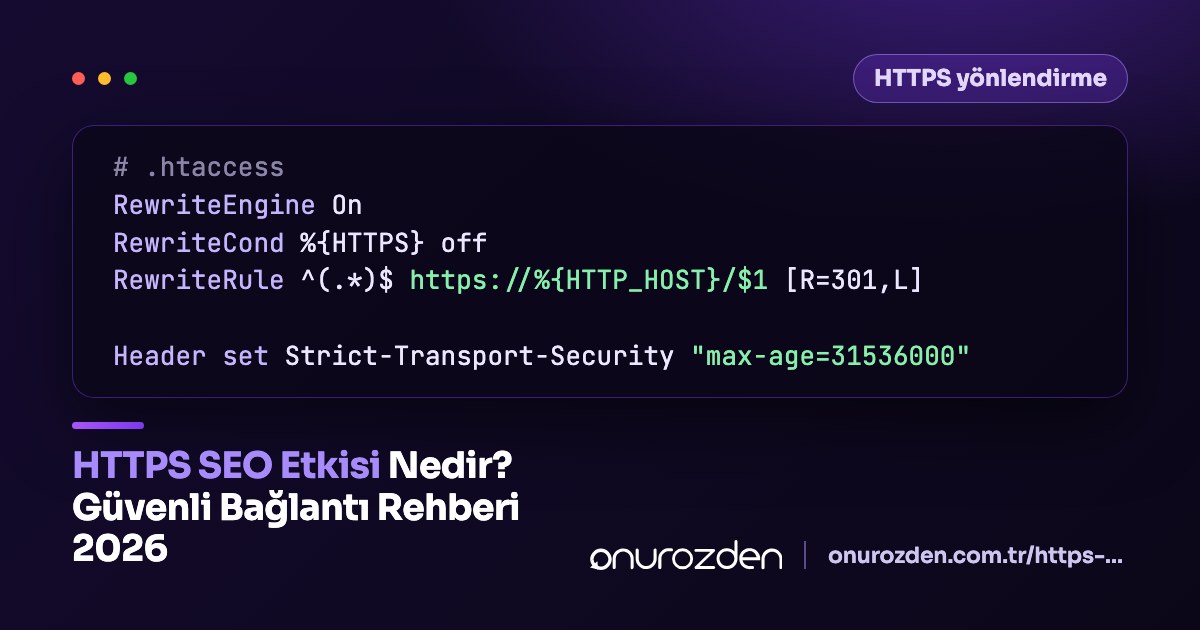
Server-side redirects are the clearest method of informing search engine bots that your site has been moved to a fully secure connection. On Apache based servers, this can be easily done with a few lines of code added to the .htaccess file. If this configuration is not made, your site will remain live with both HTTP and HTTPS versions, and this may cause duplicate content problems. a professional server optimisation These settings must be made meticulously within the scope of the work. Below is the standard code block that automatically redirects all traffic to the HTTPS protocol:
RewriteEngine On
RewriteCond %{HTTPS} off
RewriteRule ^(.*)$ https://%{HTTP_HOST}%{REQUEST_URI} [L,R=301]
The operation of the above codes is as follows: The first line activates the Apache module. The second line checks whether the connection is secure yet. The last line directs the user to the correct address with a 301 permanent redirect if the connection is not secure.
Impact of 'Not Secure' Warning on User Experience
Warnings that appear on sites without an SSL certificate directly negatively affect user psychology and reduce conversion rates. When a user enters your website and sees a red warning in the address bar, they will hesitate to share their credit card information or fill out a form. This situation causes financial losses that are difficult to compensate for e-commerce sites. For example, let's consider an e-commerce site with 15,000 monthly visitors. When this site gives an SSL certificate error on the payment page, it is observed that 35% of the users in the cart confirmation phase abandon the page. This means losing over 5,000 potential sales every month. By monitoring such behavioral data, Google notices that users are quickly moving away from your site and marks you as an unauthoritative site, relegating you to the lower ranks.
Which SSL Certificate is More Advantageous for SEO?
Although there are SSL certificates with different levels of verification on the market, all certificates have essentially the same value in terms of the ranking factor of Google. The most important criterion for SEO is that the certificate is valid and recognized by browsers. However, in terms of corporate trust and prestige, high-level certificates indirectly contribute to brand authority. The certificate type you choose may vary depending on the type and size of your site. You can review the commonly used SSL certificate types and features in the table below:
| Certificate Type | Verification Level | Intended Use | Perception of Trust |
|---|---|---|---|
| DV SSL | Domain Name Only | Blog and small sites | Standard |
| OV SSL | Institution Verification | Medium-sized businesses | high |
| EV SSL | Extended Control | Banks and large institutions | Ultimate |
SEO Checks to be Done After HTTPS Installation
Once the installation is finished, a series of tests are required to verify the technical health of the site. These tests are vital to ensure that the indexing process is not interrupted and the link juices flow correctly. Firstly SEO compatible URL structure All internal connections must be protected and checked. Then, it should be checked whether the sitemap address in the robot.txt file is updated or not. If you are using a site based on WordPress WordPress security optimisation Within the scope of database queries and HTTP residues should be cleaned. We offer free HTTP Header & Security Checking You can easily test the status of your site with our tool. When you enter your URL address into this tool, you can see the response codes returned by your server and the configuration errors of your SSL certificate within seconds.
Common Mistakes in HTTPS and SSL Process
Some mistakes made during technical transitions can cause traffic to decrease, contrary to the expected SEO increase. One of the most common problems is the Mixed Content error. This error occurs because although the page is loaded over HTTPS, files such as images, CSS, or JavaScript are still called with the HTTP protocol. This causes the lock icon in the browser to become corrupted. Other common errors and their solutions include:
- Certificate Renewal Forgetfulness: When the SSL period expires, the site will be closed to access. As a solution, automatic renewal features should be activated.
- Old Canonical Tags: Canonical tags within pages should be updated to HTTPS.
- Old Sitemaps: Maps submitted to Google Search Console must include the new protocol.
- Old Property Record: Only the HTTP version remains as the Google Search Console property. Solution: Domain type property or new HTTPS property must be opened.
Building a secure website is one of the most strategic steps you should take to both protect your users and increase your Google rankings. A correctly technically configured HTTPS protocol will strengthen your presence in the digital world. You can get professional support or use our free tools to improve the security and performance of your website.
Does an SSL certificate directly increase SEO rankings?
Yes, Google accepts the HTTPS protocol as an official ranking signal and prioritizes secure sites.
Will I lose rankings when switching from HTTP to HTTPS?
When switching with correctly configured 301 redirects, there will be no ranking loss, on the contrary, traffic increase will be achieved in the long term.
Is there an SEO difference between free SSL and paid SSL?
In terms of search engines, there is no ranking difference between free SSL (such as Let's Encrypt) and paid options.
What is Mixed Content error?
This is a situation where some files on a page with HTTPS are still called with the insecure HTTP protocol, causing a browser warning.
What should I do in Search Console after HTTPS installation?
You must add a separate property for the new HTTPS protocol or check the data of the existing domain property.