






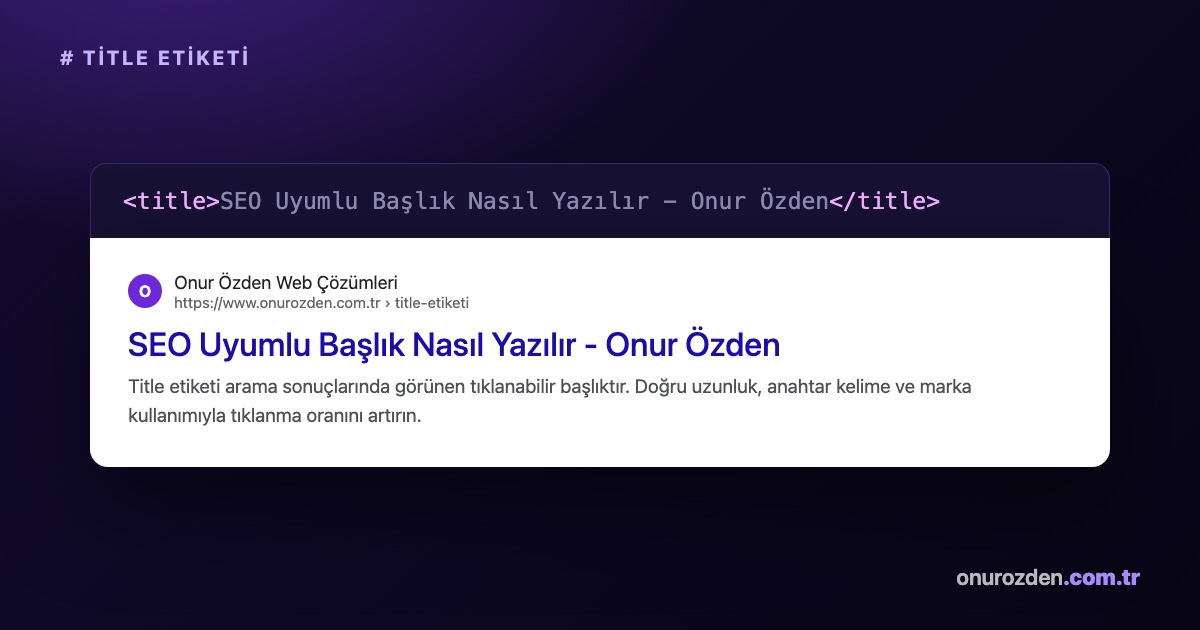
What is a title tag? The simplest answer to the question is that it is the most critical meta tag in the HTML code structure, which informs search engines and users about the subject and title of a web page. This tag appears as a blue clickable title in browser tabs, social media posts, and most importantly, Google search results. A correctly structured title tag ensures that your website is correctly understood by search engine bots and directly affects users' decision to visit your site.
What is a Title Tag and Why is it Important?
The title tag is the most important optimization element that determines the identity of a web page and stands out first on search engine results pages (SERP). Google and other search engines first crawl and index this tag to understand what your page is about. In terms of user experience, the most fundamental factor that determines whether a searcher will click on your site is the attractiveness of the title.
For example, let's take a local business that provides combi boiler service throughout Izmir. Just writing "Home Page" as the title tag on the home page of this business does not give any information to search engines and does not attract the attention of users. However, when we update the title tag to "Izmir Combi Boiler Service - 24/7 Fast and Guaranteed Repair", we target both the local search volume and significantly increase the click-through rate. This simple change directly moves the site's visibility and organic traffic up in search results.
How to Use Title Tag in HTML Code Structure?
In the HTML code structure, the title tag is a technical element that must be placed in the head section of a web document. This tag should be defined only once per page and should most clearly summarize the main topic of the page. Title tags that are placed incorrectly or written in the body section may not be crawled by search engines.
<!DOCTYPE html>
<html lang="tr">
<head>
    <meta charset="UTF-8">
    <title>Title Etiketi Nedir? SEO Uyumlu Başlık Yazım Rehberi</title>
    <meta name="description" content="Title etiketi hakkında teknik detaylar ve SEO uyumlu başlık yazım kuralları bu rehberde.">
    <link rel="canonical" href="https://www.onurozden.com.tr/blog/">
</head>
<body>
</body>
</html>
The doctype declaration in the lines of code above indicates that the document is in HTML5 standards. The lang attribute of the html tag on the second line tells browsers that the page language is Turkish. The meta charset line located just below the head tag ensures that Turkish characters are displayed correctly. While the title tag in the fifth line determines the title of our page, the meta description line below it creates the short description in the search results. Finally, the canonical tag indicates the original and preferred address of the page to the search engine. To check the accuracy of these codes on your site Meta Tag Analysis You can quickly check using our tool.
What are the SEO Compatible Title Writing Rules?
Writing an SEO-compatible title requires both complying with the technical limits of search engine algorithms and using creative language that appeals to human psychology. Your title should neither be too short and provide insufficient information, nor should it be too long and be interrupted in search results. A balanced and focused title structure is the key to organic ranking success.
To achieve success in search engines, you should definitely follow these 5 golden rules when optimizing your titles:
- Respect Character Limit: The length of your title tag should be between 50 and 60 characters, including spaces. On a pixel basis, care should be taken not to exceed the 600 pixel limit.
- Use Keyword First: Use the main keyword you are targeting as far to the left of the title as possible, that is, among the first words.
- Include Brand Name: Adding your brand name using a short bracket at the end of the title increases your corporate awareness.
- Choose Click-Oriented Words: Include user action phrases in your title, such as “Guide,” “How To,” “Up to Date,” or “Step by Step.”
- Avoid Duplicate Headlines: Make sure each page on your site has a completely unique title tag.
In addition to these rules, to make your content comply with general SEO standards How to Write an SEO Compatible Blog Post You can review our guide and shape your content according to these standards.
Successful Title Tag Examples by Industries
Since the target audience and search intent of each sector are different, title tag templates also vary on a sectoral basis. While product features come to the fore on e-commerce sites, trust and professionalism should be emphasized on corporate service sites. Correctly designed headlines directly affect your conversion rates.
In the table below, you can see the comparison of bad headlines that are not optimized for different sectors and successful headlines that are adapted to SEO standards:
| Page Type | Incorrect Title Example | Optimized Title Example | Strategy Used |
|---|---|---|---|
| E-Commerce Product | Buy Men's Shoe Models | Red Leather Men's Sports Shoes - MarkaAdi | Use of product colour, material and brand name |
| Category Page | Women's Dresses Are Here | Women's Dress Models and Prices - 20% Discount | Search intent and discount rate emphasis |
| Corporate Service | Who are we? - Law Office | Istanbul Divorce Lawyer - Expert Legal Support | Location targeting and professional expression that inspires confidence |
As can be seen in the table, target-oriented and detailed headlines both enable search engines to better understand the page and make users want to click. Regardless of your industry, you should definitely highlight user benefit in your headlines.
Common Mistakes When Writing Title Tags
One of the most common SEO mistakes on websites is that title tags are created carelessly or randomly by automated systems. These errors may cause your site to not receive the ranking it deserves in search results and may even face spam penalties. Identifying and fixing errors early is the safest way to protect your organic performance.
The most common headline mistakes and their correct solutions are as follows:
- Keyword Stuffing: It is a big mistake to write the same word or close variations of it repeatedly in the title. For example, instead of a title such as "Boiler service, boiler repair, boiler master, boiler", a natural title should be written as "Guaranteed Boiler Service and Repair Services".
- Titles That Are Too Long or Too Short: Just don't use titles that are too short like "Our Services" or longer than 80 characters that try to describe the entire page. Optimize your title by always keeping it within 50-60 characters.
- Use of Duplicate Title: Having hundreds of pages on the site with the same title confuses Google bots. You must produce a unique title for each page, specific to the content of that page.
- Leaving the Title Blank: If the title tag is left completely empty in the code structure, Google selects a random sentence from the page as the title. This causes you to lose control; Be sure to define a manual title for each page.
Google How to Perform Title Analysis with the SERP Preview Tool?
You need to test before publishing how the title tag you wrote Google will appear in search results and whether it will be interrupted or not. Titles that exceed the pixel limit are truncated by Google with an ellipsis at the end, creating an unprofessional appearance. To avoid this technical problem, preview tools should be used.
Free on our site Google Result (SERP) Preview You can easily analyze your headlines using the tool. After logging in to the tool, simply write the title and meta description you have chosen in the relevant field. The tool simulates live exactly how the characters you type Google will be listed in mobile and desktop search results; This way, you can see whether your title will be cut or not and make the necessary corrections before publishing.
Increasing your website's visibility in search engines, fixing technical errors and creating a conversion-focused content strategy requires a professional touch. In order to ensure that your site ranks at the top of the search results, you can get professional support from our expert team and grow your business in the digital world.
How many characters should the title tag have?
In order for your title to appear fully in the search results without being truncated, the title tag must be between 50 and 60 characters, including spaces.
Why is Google changing my title tag itself?
If the title you write doesn't match the page content, is too long, or contains keyword clutter, Google can automatically change the title to improve the user experience.
What is the difference between H1 tag and title tag?
The title tag is the meta title that appears in search results and browser tabs; The H1 tag directly represents the main title in the page content.
Is it mandatory to use a brand name in the title tag?
Although not mandatory, adding the brand name to the end of the title is extremely beneficial for corporate credibility and brand awareness.